HelpComputerGeek · Wedding Websites

A wedding website that runs the RSVPs, the guest list and the big day.

Every couple gets a beautiful site their guests actually use, and a private dashboard that keeps the replies, meals, seating and photos in one place. We build it, host it and keep it running. The couple never touches a server.

One-time · includes two years of hosting · pricing details

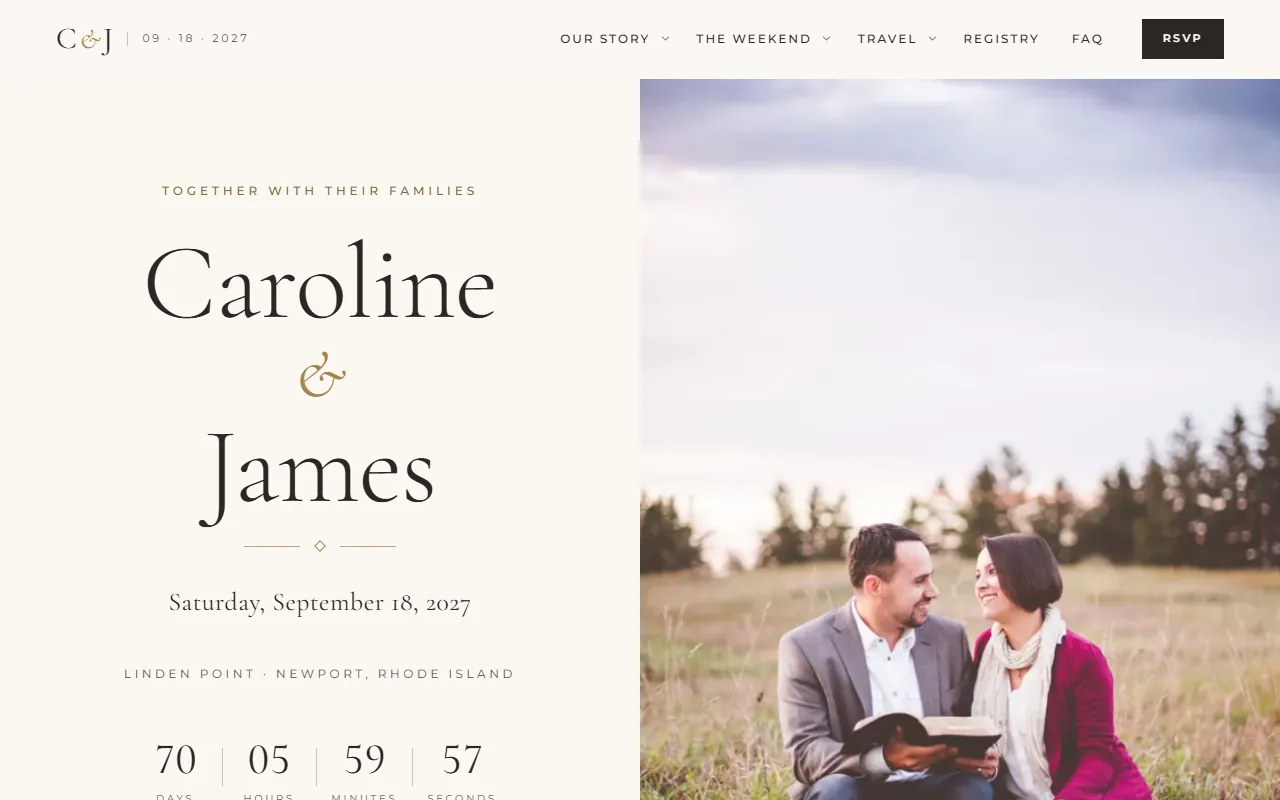
The demo wedding website’s home page: Caroline and James, Saturday, September 18, 2027, with a countdown
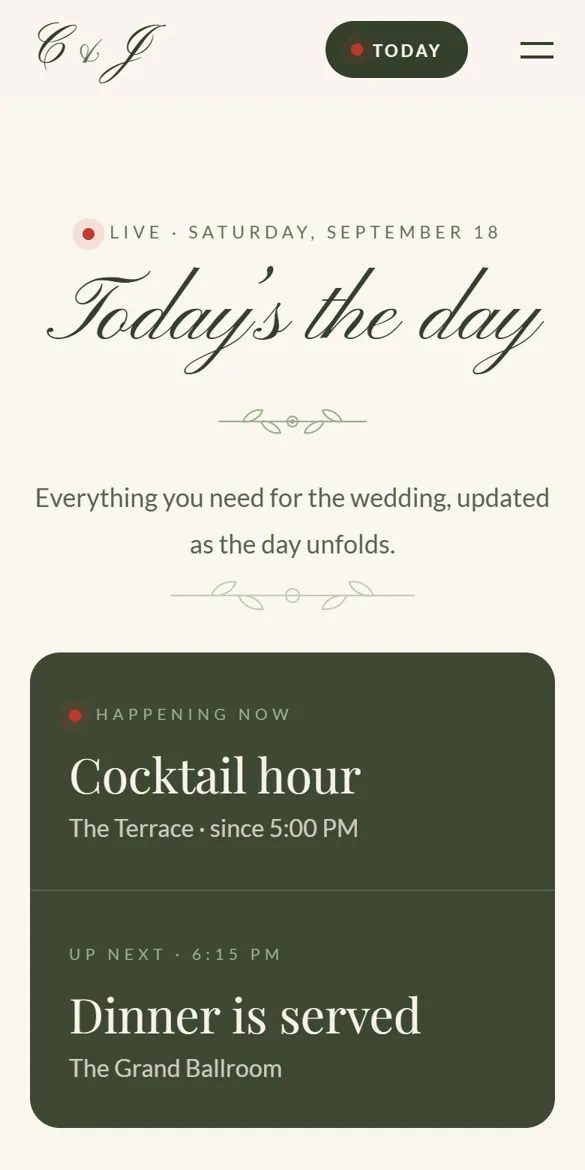
The live wedding-day guide on a phone: happening now, cocktail hour; up next, dinner is served

At a glance

Three groups of people, one site

For guests

Everything in one link

  • RSVP in a couple of minutes, on any phone
  • Schedule, travel, hotels and dress code
  • A calendar that updates itself when times change
  • A live wedding-day guide with their table
  • An invitation-style opening and a song to play, if the couple wants them
  • Share photos and videos from their phone

For the couple

A private dashboard

  • Every reply, headcount and meal count, live
  • Drag-and-drop seating and a printable seating chart
  • A floor plan they design themselves, with every room of the venue
  • Reminder emails with one click
  • Caterer, address and place-card spreadsheets
  • Change hotels, FAQ, registry and more themselves

Handled for them

We do the technical part

  • Design in one of 30 styles and their wedding colors, with their photos
  • An opening (a paper folio that unfolds) and wedding music, set up from their answers
  • Hosting, email delivery and security
  • Setup from a simple online questionnaire
  • Changes to dates and event times
  • Help whenever they need it

It changes with the calendar

One site, six seasons

The site knows where the couple is in the planning and changes what guests see by itself. Nobody has to remember to update it.

  1. Save the dateNames, date, place and a countdown. Guests can give their mailing address for the invitation.
  2. RSVPs openThe reply button takes over the home page. A banner shows the reply-by date.
  3. Final detailsReplies close. The schedule, travel and dress code are front and center.
  4. Wedding weekThe wedding-day guide goes live with the real weather forecast for the venue.
  5. Wedding dayWhat’s happening now and next, shuttles, the livestream link and “find your table”.
  6. After the weddingA thank-you, the photos, and an album where guests add theirs.

Page by page

What guests see, and who keeps it current

Every site has the same 12 guest pages plus the couple’s private dashboard. A page with nothing on it (no wedding party, no things to do) leaves the menu by itself, and comes back as soon as the couple adds something.

Couple changes itWe set it upAutomatic

Home

The front door

Names, date and place, a countdown, the welcome message, the weekend’s events, a peek at their story, where to stay, and the right next step for the season: update your address, RSVP, the wedding-day guide or the photos.

Welcome messagePhotos, names, dateChanges by season

Our Story

How it all began

How they met, told from both sides. A timeline of milestones with photos, the proposal, and a gallery of favorite pictures.

Written from their answers

Schedule

The weekend

Every event with time, place, map link and dress code. Invite-only events, like the rehearsal dinner, only show to the guests invited. One tap adds the whole weekend to their calendar, and it updates by itself if a time changes.

Events and timesCalendar updates

Travel & Stay

Getting there

Airports and driving, hotel room blocks with group codes and booking links, a reminder of when the blocks are released, shuttle times there and back, parking and rideshare tips.

Hotels, shuttles, tipsBlock deadline reminder

Things to Do

Make a weekend of it

The couple’s favorite places nearby, grouped into See, Eat & drink and Relax, with their own insider tips.

Places and tips

What to Wear

The dress code

The dress code in plain words, looks for every guest, a color palette to wear and colors to avoid, the dress code event by event, practical tips (grass, heels, evening chill) and the weather to expect. In wedding week it shows the actual forecast (US venues).

Set up from their answersForecast

Registry

Gifts & giving

A note about gifts, their honeymoon or cash fund, registries at any store, and a charity if they prefer donations. Every button goes straight to the couple’s own registry or fund page. We never handle any money.

Links and wording

Wedding Party

The people beside them

Both sides of the wedding party with a line about each person, plus the officiant, flower girl and ring bearer, and a note remembering loved ones.

People and roles

FAQ

Questions & answers

Answers to what guests always ask (plus-ones, kids, parking, an unplugged ceremony, the livestream), grouped by topic with a search box.

Questions and answers

RSVP

The reply

Guests type their name and find their own invitation. They answer for each person and each event they’re invited to, choose a meal (kids’ meals only for children), and add dietary needs, a plus-one’s name, a song request, a note to the couple, their mailing address and whether they’ll ride the shuttle.

They review before sending, get a confirmation email, and can change their reply until the deadline. Reminder emails open their invitation directly.

Questions and mealsEmails and reminders

Photos

The album

Engagement photos before the wedding, the professional photos after. Guests add their own photos and videos from their phone, often by scanning a QR code on the tables. Photos are resized for the web and hidden location data is removed.

Hide or remove uploadsTheir own photos

Wedding-Day Guide

Live on the day

What’s happening now and what’s next, the hour-by-hour plan, shuttles, the forecast (US venues) and sunset time, the livestream link when it starts, the venue Wi-Fi with a copy button, the menu, the order of service and who to call. Guests type their name to find their table (and seat).

Wi-Fi, menu, contactLive now and next

Live updates

On every page

A banner across the top of every page. The site posts its own reminders through the seasons; the couple can post a live update any time, like “Ceremony moving indoors, same time”.

Post an updateSeasonal reminders
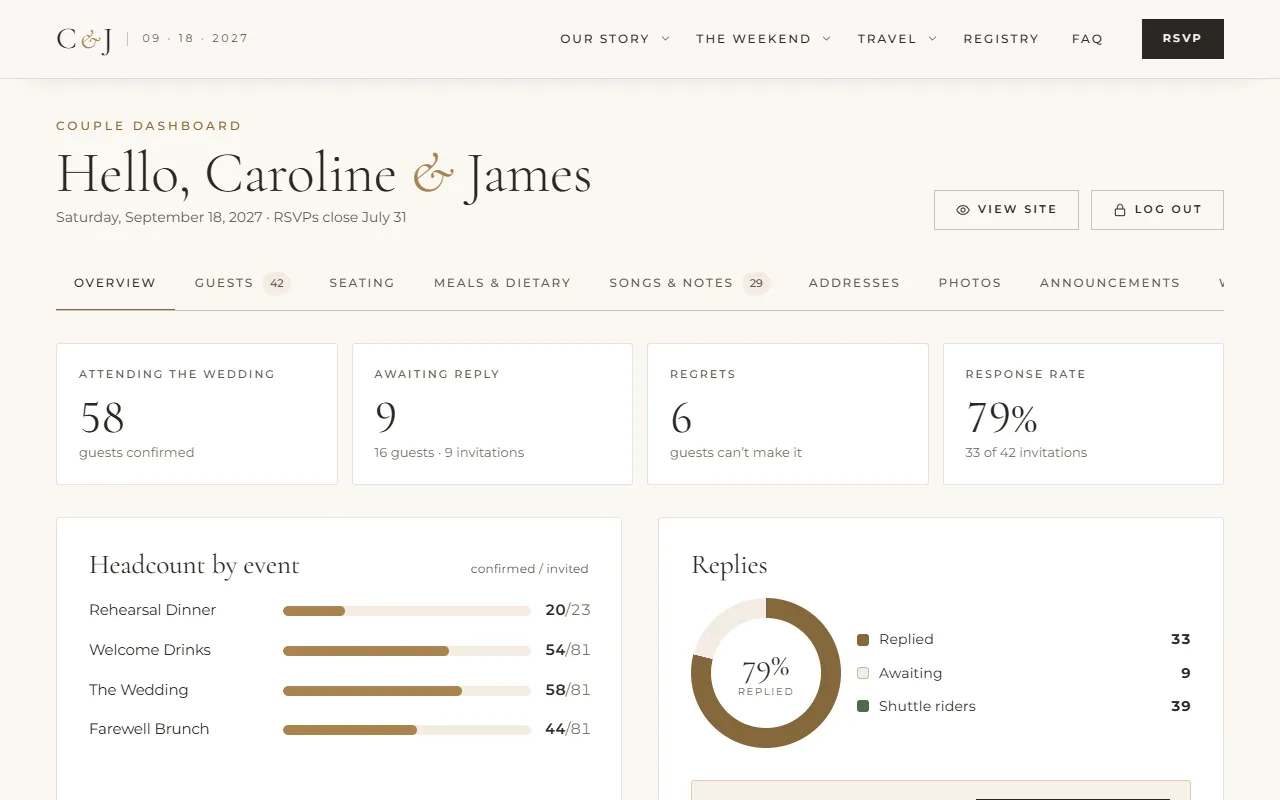
The couple dashboard: guests attending, awaiting reply, regrets, response rate, headcount by event and a reply chart
The couple’s dashboard, from the live demo.

Couple Dashboard

Private, password protected

Overview: headcount for every event, the latest replies, reminder settings.

Guests: add or edit invitations, record replies taken by phone, send reminders.

Seating: drag invitations onto tables (or use a menu on the phone), see which tables are full, and print an A–Z seating chart for the entrance plus a page per table for the venue.

Floor plan: lay out the venue on a laptop or desktop: one room or several (a ballroom and a conservatory, say), then drag the tables, dance floor, bar, band and more into place, name the tables, set their seats and print it for the venue. Zoom from the whole venue into a room or a table. Guests see the same plan in the wedding-day guide when they look up their table.

Meals & dietary: entrée totals, allergies, meals by table, and spreadsheets for the caterer and for place and escort cards.

Songs & notes, Addresses: song requests, notes from guests, and a mailing list for thank-you cards.

Photos: every guest upload; hide, delete, download all, print QR codes for the tables.

Announcements and Website: post live updates and change their own hotels, shuttles, registry, FAQ, wedding party, things to do and wedding-day details.
All of it

Who changes what

The couple stays in control of the details

Couples change the things that change often, from their dashboard, and it shows on the site right away. We handle what everything else depends on, so nothing breaks.

Part of the siteThe couple, from the dashboardWe do it for themHappens by itself
Guest list and repliesAdd, edit and remove invitations; record replies taken by phoneBring in their first listHeadcounts and meal counts
SeatingDrag-and-drop tables, the reception floor plan, seat numbers, seats per table, printed seating chart and table listsFull and over-full tables flagged
Hotels, shuttles, travel tipsYesFirst version from their questionnaireRoom-block deadline reminders
Registry and giftsYes, with their own links
FAQ, wedding party, things to doYesFirst version from their questionnaire
Wedding-day detailsWi-Fi, livestream link, menu, program, contactHour-by-hour planNow and next, forecast, sunset
Live updatesPost or remove a bannerSeasonal reminders
Dates and event timesYes (RSVPs, reminders and calendars depend on them)Calendars update
PhotosSwap any photo for their own, choose what stays in view, fill the story gallery and the wedding-day photosFirst version from their questionnaireSized for every screen, hidden location data removed
Style and colorsChoose the style and colors, from ready-made palettes or their own wedding colorSet up from their questionnaireEvery color checked so text stays easy to read
Their storyWritten from their answers
Reminders to guestsSend with one click, or switch on automatic14 and 3 days before the deadline, if on

Emails, sent for them

The site keeps everyone in the loop

To guestsRSVP confirmationA copy of their reply, with a link to change it.
To the coupleA note for every replyWho’s coming, meals, dietary needs and any message, as it arrives.
To guestsKind remindersFor anyone who hasn’t replied, never more than once every three days.
To the coupleMonday summaryThe week’s new replies, totals, meals, tables and who’s still waiting.
To guestsAddress confirmationWhen a guest updates their mailing address.
To the coupleSetup confirmationWhen they send us their questionnaire, with the link to keep editing.

Private by design

Guests see only what’s theirs

The guest list stays private

Guests find only their own invitation by typing their name. The full list is never sent to anyone’s browser.

A password if they want one

The whole site can sit behind a password printed on the invitation.

Photos are cleaned

Uploaded photos are re-saved for the web with hidden location data removed. Payments never pass through us.

For wedding venues

Fewer guest questions for your team, and your venue on every page

Offer every couple who books with you a wedding website that already knows your venue.

Your venue, presented well

Your name, photos and description sit on the couple’s home page, schedule and travel page, shared with every guest.

Guests arrive informed

Directions, parking, shuttle times, the rain plan and the dress code are answered before anyone calls your front desk.

Day-of changes reach everyone

Moving the ceremony indoors? The couple posts it once and it appears on every page of the site, on every guest’s phone.

Accurate headcounts, early

Couples see replies, meal counts and dietary needs live, and send your caterer a ready-made spreadsheet with meals by table.

Nothing for your staff to run

We build, host and support each site. Your team doesn’t learn new software.

Works for every couple

Thirty styles, from classic and garden to modern, coastal, rustic, boho, harvest, jewel, clubhouse, enchanted, celestial, blossom, hacienda, magnolia, ranch, wildflower, chapel, highland, palm springs, retro, vintage, Mediterranean, tropical, winter, industrial and black-tie, in the couple’s own wedding colors and finished with their photos and words.

Partner with us. Ask about including a wedding website with your packages or recommending us to your couples.

Talk to us

How it works

From questionnaire to live site

  1. Tell us about it

    The couple gets a private questionnaire. It saves as they go, both partners can use it, and they can add photos and their guest list.

  2. We build it

    We turn their answers into their site, in their chosen style, with their photos.

  3. They review it

    The couple looks it over and we make the changes they want.

  4. Share the link

    The site goes live with its own address, ready for invitations, QR codes and social posts.

Pricing

One price, two years included

The website

$999

One-time. The full site, the couple dashboard, emails, photo album and two years of hosting, starting no earlier than 12 months before the wedding.

Get started

After two years

$20 / month

Optional, to keep the site and photos online.

Your own domain

$20 / year

Optional, for an address like carolineandjames.com.

Take the demo tour

Seven things to try on the demo

The demo is a real working site for a sample couple, Caroline & James. It resets every night, so click anything you like.

Open the live demo

Jump through the seasons

Use the bar at the bottom to switch from “Save the date” to “Wedding day” and watch the home page and banner change.

Design your look

Switch styles and colors from the same bar and see the whole site change. Like it? Press “Get a site like this” and we build your site in that look.

Open it like an invitation

The demo’s home page opens this way on your first visit: tap the band and the paper folio unfolds. To see it again or try the other one, press “Tour” in the bar at the bottom and pick a folio. Then tap “Play music” (bottom right) to hear the song. Couples can turn either one on or off, and choose their own song.

RSVP as a guest

On the RSVP page, search for Emily Chen and reply for her invitation.

Open the couple’s dashboard

Use the password forever to see replies, meals, seating and photos.

Change the website yourself

In the dashboard’s Website tab, edit a hotel or a question, then look at the Travel or FAQ page.

Design the venue, find your table

On a laptop or desktop, open the dashboard’s Floor plan tab: the whole venue, then click a room to arrange its tables. Then switch to “Wedding day”, open the wedding-day guide and type a guest’s name: the plan zooms into their room and their table lights up.

Ready when you are

Book your wedding website today. We’ll email your questionnaire, build your site, and you’ll have a link to share before the invitations go out.